Following it, I got much better results; I little wrinkling on both sides, but I was able to (mostly) work around it. I should be able to avoid that next time. The 6pt fonts all showed up well; a few missing letters (not enough pressure when I applied the film). Two of the three sections of 4pt font are vaguely legible, and the 3pt fonts are garbled similarly. None of the 2pt fonts made it, though (it was a stretch that they would, anyway).
Three of the four QFN-16 adapter boards are PERFECT (yay!), and the other once can be salvaged. One of the DFN-8 boards are almost perfect, the other two might have too many problems with the 3[mm] traces, for which the precision is extremely important, so they may not be useable (I only needed one, anyway).
Back of board after developing the photoresist. Green electrical tape is there to protect the parts ruined by the wrinkling of the film when I applyed it. The exposed section is for the back of the QFN-16 adapter boards.
Now for the front of the board. A few places of missing text, but everything looks decent, overall.
The boards after etching and cutting (box cutter, ruler, and hand-breaking; jeweler’s saw is too slow, and dremel is too messy)
The end result; two working boards!
These two use the MASW007107 RF switches, and are test boards for my Senior Design project for school; I will find out how well they work next week! They should work on signals up to 8GHz, but I can’t test that without a Vector Network Analyzer.
This is the result of the third attempt to get the photoresistive film applied decently (very difficult) and gets some boards going. At quandrants 2,3, and 4, I have a test board for an RF switch I am using for my Senior Design project; in the first quandrant are 4 adapter boards for an accelerometer IC I got so I could play with it for an idea I had. Either way, these are going to be redone before I etch them.
Results are not great; none of the 7 boards turned out completely perfect. I think I’m just going to remove it, seek out some finer sandpaper, and… I don’t know. The really hard part is getting rid of the air bubbles in the application of the film (the effect of which can be see on the back, where I didn’t bother trying to stop them since I only needed to focus on one side for the boards). Any suggestions?
Front (useful) side of the board. Imperfections make the RF boards useless; the adapter boards could be salvaged, but I don’t wanna.
Back (silly) side of the board. Looks cool, but I can’t etch the boards like this, really. I could mask the whole side, but I’m going to redo it anyway.
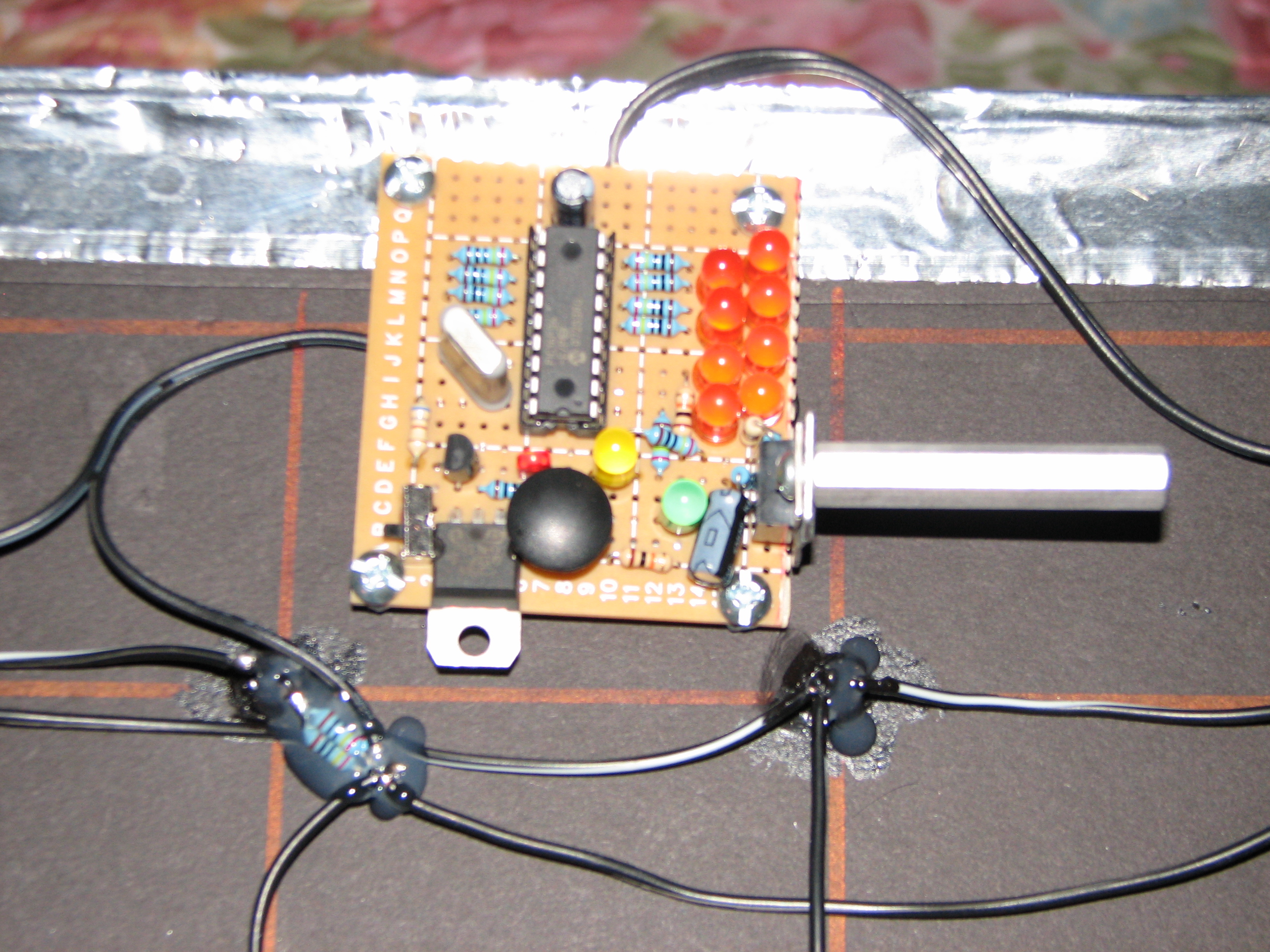
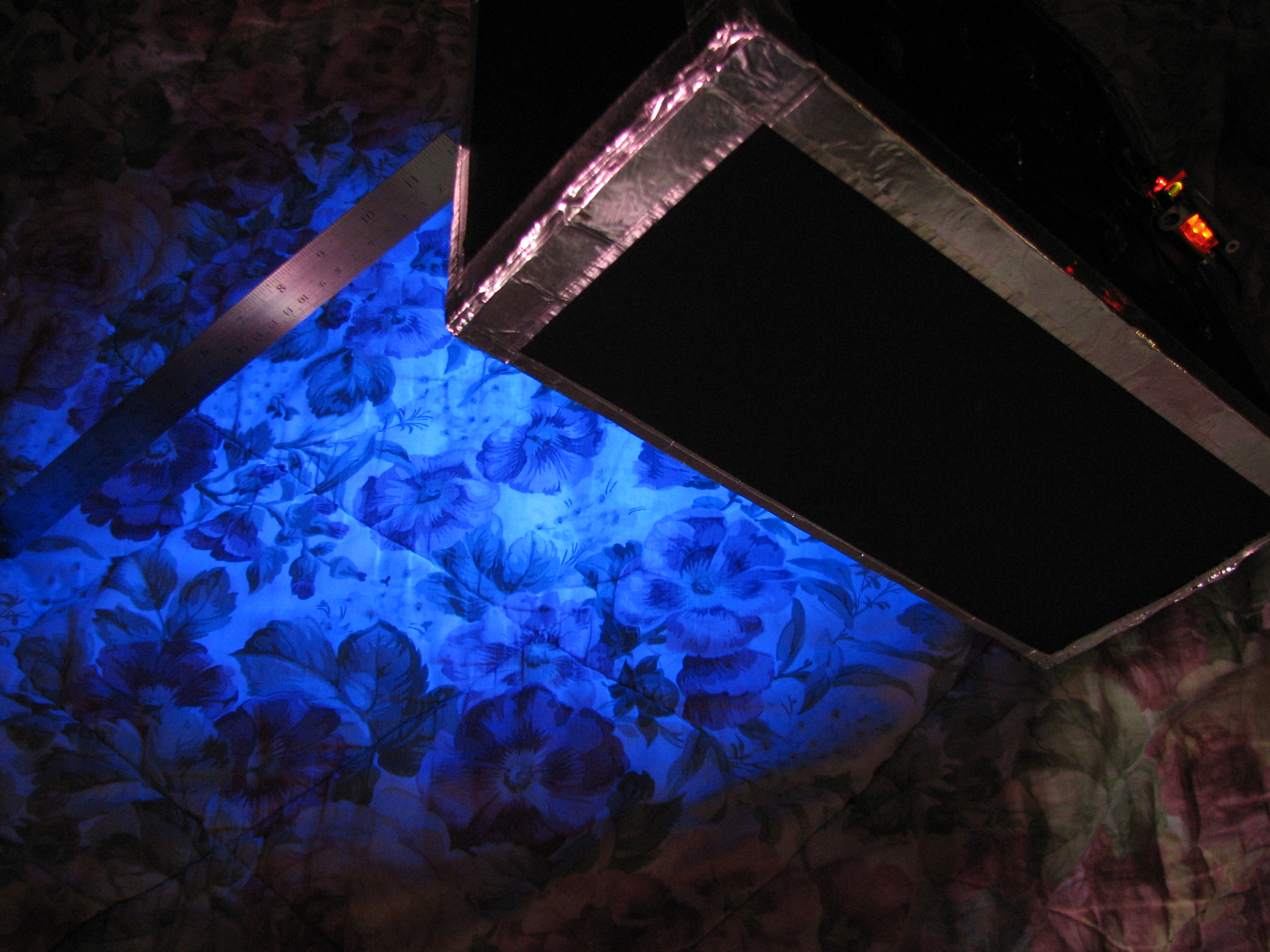
Close-up of the controller board (upside down! Muahahah!).
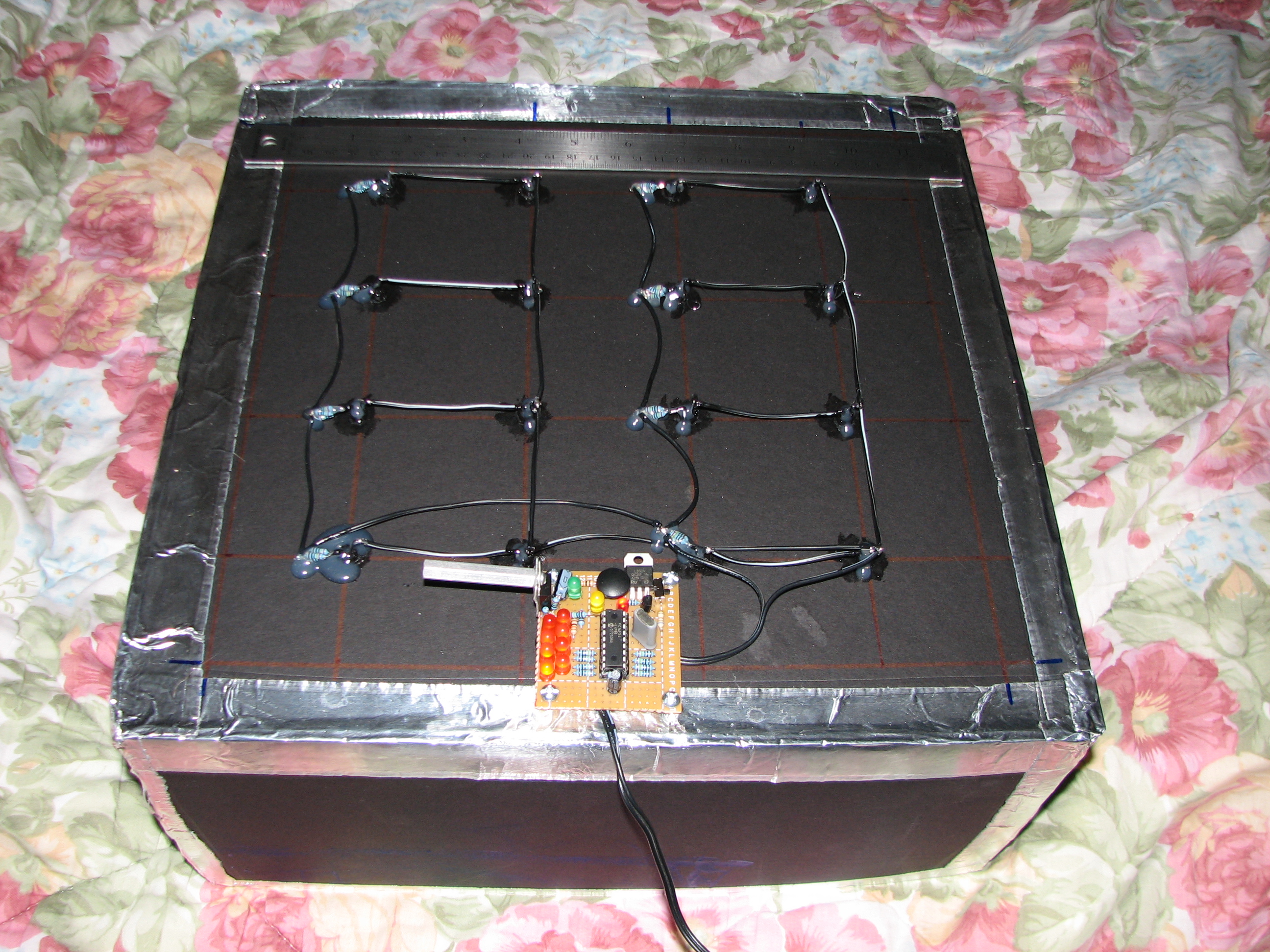
The red LED indicates power is connected to the microcontroller (controlled by the small switch in the corner or just by unplugging the wall-wart). Pressing the round black button adds 30 seconds one minute to the timer, which is indicated in binary on with the 8 orange LEDs; it is limited to 255 seconds (4 minutes, 15 seconds) and suffers overrun if you press the button enough times 8 minutes and doesn’t loop back to zero. Power is applied to the ultraviolet LEDS whenever the timer is greater than zero, which can be indicated by (a) the yellow LED indicating the UV lights are on, (b) the green led blinking once per second as the timer counts down, or (c) the bottom of the box emitting a faint blue glow. The assembly code I spent an afternoon writing can be found at the bottom of this post, if you are curious (My first real ASM program! It was actually kinda fun!).
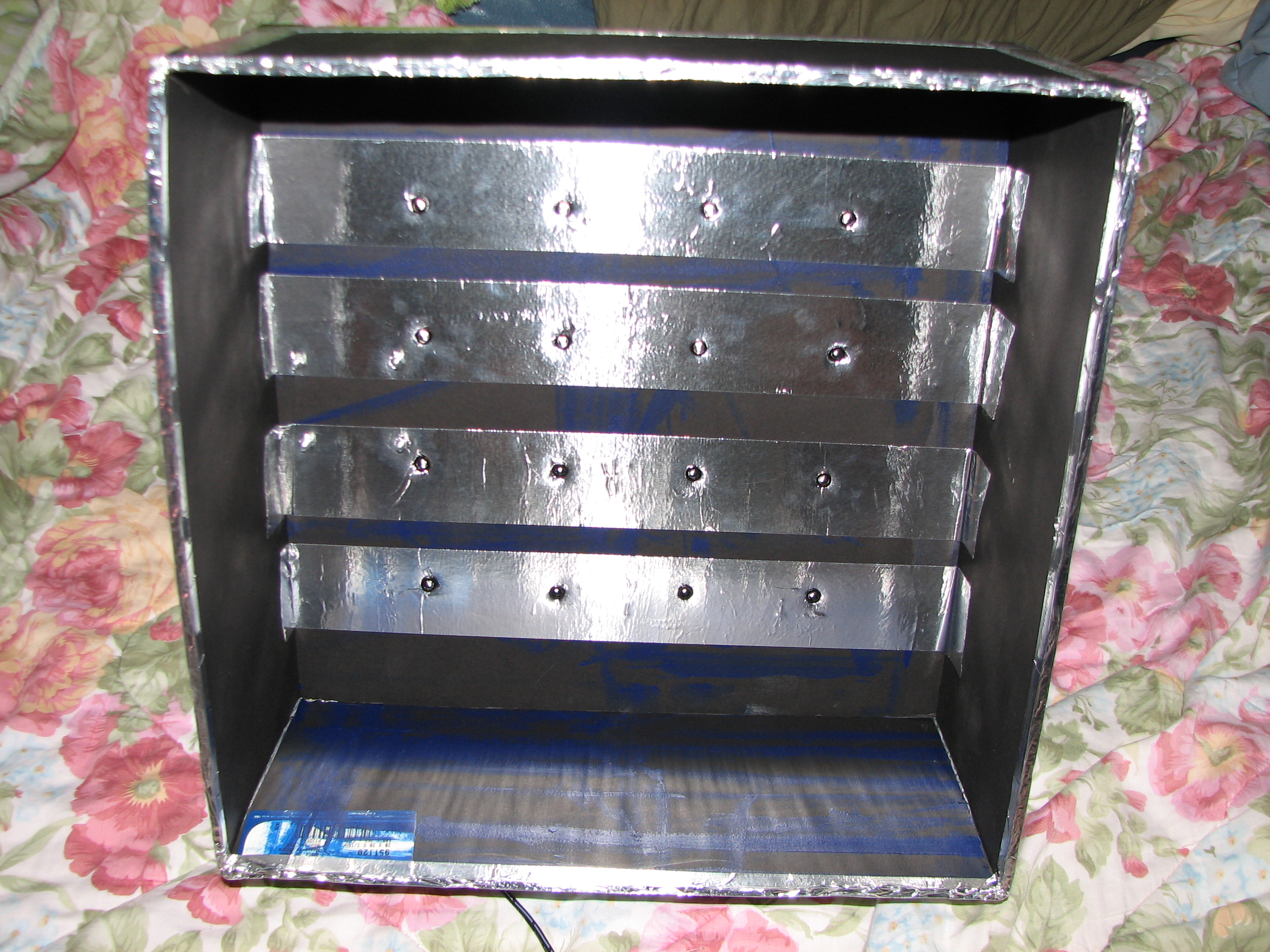
Inside of the light box; still not sure what the cat likes about this place, but he sure likes trying to get in there.
Measurements indicated that the ultraviolet LEDs are using 22.5[mA] each, so the box should be outputting a total luminous intensity of at wavelengths between 350[nm]-420[nm] (peak @~380[nm]). The MG Chemicals photoresist film that I use has an exposure sensitivity between 315[nm]-400[nm], with a peak response at 355[nm]-380[nm] (good design, huh? ;D).
The UV LED array has a square spacing of 2.5″, meaning the center of four adjacent LEDs is away from any given led. Using the Radiation Diagram from the datasheet, the minimum surface distance from the tip of the LEDs at which the light cone would be at 25% intensity at these centers is then . I interpret this as the minimum distance an object needs to be from the UV LEDs in order for the light to be relatively uniform across the whole surface. Beyond this distance, it should become even more uniform; fortunately, my two glass plates, a standard 1/16″ copper clad board, photoresist film, and artwork transparencies add up just under 3/8″, so all is well for my application. The largest copper clad board I ever plan to use is 8″x10″, so my 2.5″ spacing works to keep the UV light at a decent intensity on the edges.
Just showing off the light emission.
; Timer for UV Light Box Control; Initially off. Waits for input to set length of ON time, waits for lack of input, then starts. PORTB acts as indicator of number of minutes to set timer.; PIC16F54 @ 3.579545 MHz; Drew Jaworski 2012
#include <p16f5x.inc>
__CONFIG _HS_OSC & _WDT_OFF & _CP_OFF
UDATA
; delay counter vars
dc1 res 1
dc2 res 1
dc3 res 1
ptm res 1; 60 second run timer
PROG CODE
init
movlw b'11110010';RA0 is UV control output, RA1 is timer increment button input (active low), RA2 is clock indicator LED output, RA3 is UV on indicator
tris PORTA
movlw 0x00;RB7-RB0 are time display outputs
tris PORTB
start
movlw 0x00;set all outputs OFF initially
movwf PORTA
movlw 0x00;initial time to display
movwf PORTB
movlw 0x3C; initial minute run timer setting (59)
movwf ptm
wait_start
btfsc PORTA,b'001';check button status
goto wait_start ;skip back if button was not pressed
wait_input
;delay 0.25 seconds
movlw 0xC7
movwf dc1
movlw 0xAF
movwf dc2
Delay_2
decfsz dc1, f
goto $+2
decfsz dc2, f
goto Delay_2
;end delay
btfsc PORTA,b'001';check button status
goto begin_run_timer;start if button was not pressed
btfsc PORTB,b'000'
goto $+3
bsf PORTB,b'000'
goto wait_input
btfsc PORTB,b'001'
goto $+3
bsf PORTB,b'001'
goto wait_input
btfsc PORTB,b'010'
goto $+3
bsf PORTB,b'010'
goto wait_input
btfsc PORTB,b'011'
goto $+3
bsf PORTB,b'011'
goto wait_input
btfsc PORTB,b'100'
goto $+3
bsf PORTB,b'100'
goto wait_input
btfsc PORTB,b'101'
goto $+3
bsf PORTB,b'101'
goto wait_input
btfsc PORTB,b'110'
goto $+3
bsf PORTB,b'110'
goto wait_input
btfsc PORTB,b'111'
goto wait_input
bsf PORTB,b'111'
goto wait_input
begin_run_timer
bsf PORTA,b'000'
bsf PORTA,b'011'
run_timer
;delay 0.5 seconds
movlw 0xAF
movwf dc1
movlw 0xFA
movwf dc2
movlw 0x01
movwf dc3
Delay_0
decfsz dc1, f
goto $+2
decfsz dc2, f
goto $+2
decfsz dc3, f
goto Delay_0
goto $+1
goto $+1
nop
;end delay
bsf PORTA,b'010';set led;delay 0.5 seconds
movlw 0xAF
movwf dc1
movlw 0xFA
movwf dc2
movlw 0x01
movwf dc3
Delay_1
decfsz dc1, f
goto $+2
decfsz dc2, f
goto $+2
decfsz dc3, f
goto Delay_1
goto $+1
goto $+1
nop
;end delay
bcf PORTA,b'010';clear led
decfsz ptm,f ; decrement run_timer
goto run_timer ;continue next cycle if iwt decrement result was not zero
movlw 0x3C
movwf ptm ;reset run timer if it hit zero;also remove a minute from timer
btfss PORTB,b'111'
goto $+3
bcf PORTB,b'111'
goto run_timer
btfss PORTB,b'110'
goto $+3
bcf PORTB,b'110'
goto run_timer
btfss PORTB,b'101'
goto $+3
bcf PORTB,b'101'
goto run_timer
btfss PORTB,b'100'
goto $+3
bcf PORTB,b'100'
goto run_timer
btfss PORTB,b'011'
goto $+3
bcf PORTB,b'011'
goto run_timer
btfss PORTB,b'010'
goto $+3
bcf PORTB,b'010'
goto run_timer
btfss PORTB,b'001'
goto $+3
bcf PORTB,b'001'
goto run_timer
btfss PORTB,b'000'
goto run_timer
bcf PORTB,b'000'
goto start ;reset everything if time has run out
END
I wanted to make something special for people I know to give as Xmas gifts this year, so I went into engineering mode and came up with something fairly simple, but still fun. Admittedly, this isn’t for everyone, but I don’t care; if they can’t at least pretend to appreciate my hard work and creativity, then they just won’t get the cooler stuff I’ll make next year! That didn’t happen with anyone, fortunately; they all at least seemed vaguely interested. My sister didn’t like the blinking, though, so she gave hers to my mom. Everything was purchased through Mouser.
Close-up of one of the devices (1.25″)x(2.125″).
Essentially, it is a small PCB with two CR2032 batteries (soldered in, because battery sockets seem to cost twice as much as the batteries themselves!), a 5[V] regulator, a pic16f616 microcontroller, an RGB LED, two phototransistors, and some passive components. The PIC is programmed in C (compiled with SDCC, and programmed via ICSP with PicProm), and designed to cycle the RGB colorspace at a cycle rate and PWM frequency which varies depending on input from the two phototransistors.It has many uses! Annoy strangers! Cause epileptic seizures! Run down the batteries and ask me to replace them! Put them in your storage/trash and hope I never ask about them again! It doesn’t matter!
Schematic (created with Eagle 5.11 Light).
PCB Layout (created with Eagle 5.11 Light).
One possible use. Music by The Black Dog. Note: The moving lines are just an artifact of the image sensor on my camera playing catch up with the PWM drive of the LEDs; the real devices do not cause scrolling lines to occur in real world use,
On the long, ranting personal experience and electronics construction details side, this was a very fun and time-crunched project to make. I came up with the idea of making something using a surface mount microcontroller and an onboard battery about one week before Xmas; I had the parts list ready (with a rough idea of how to combine it all) on Sunday and made the order with Mouser on Monday afternoon. Kim ended up paying for them, because I am broke until school starts again; she also helped me with some testing and conceptual feedback, so these were partly her gifts to my family as well. I am very fortunate that Mouser is located in Texas, because I not only get to pay taxes (wait, what?), but Ground shipping only takes two days! I took those two days and used them to make sure my programming equipment was up to date and could work; I was able to get some pic16f54 devices programmed, but it turns out the pic16f616 line is a newer breed that wouldn’t work with my programmer (the passive one on the PicProm website ended up working just fine on my breadboard). I used a 0.300″ SOIC->DIP adapter for the chips, which are 0.150″ wide, so it took some work to get them on there with wire extensions. From there, I just tried various things based on the datasheet and some examples of using SDCC available around the web. I was rushing, but I still didn’t have a finalized design until Thursday evening.
SOIC Breakout board used for prototyping during the design process.
That’s when the real fun began! I’ve been using the well-known laser toner transfer method for a while for making PCBs, as well as a Cupric Chloride etchant (HCl and Hydrogen Peroxide as main ingredients), but I need something better for surface mount work (especially since I will need to use what I learn for my Senior Design project soon; I have some (2mm)x(2mm) ICs just waiting around to be used! The photoresistive process has been backed as allowing much better resolution, little to no distortion, and easily reproducible results. Fortunately, Mouser sells a product by MG Chemicals which is a photosensitive film that can be applied to bare copper (which can be found cheap online at Parts Express, btw). I wasted a 12″x11″ piece of the film because the instructions are flawed, however; they claim it turns from “green to blue” when exposed to UV light, but, in fact, it is BLUE ALREADY! It changes to a darker blue when exposed, as I found out after further testing and concluding that just leaving it outside for 10 minutes or so (even on a thoroughly cloudy day) is enough UV exposure to do the job. None of my compact fluorescent bulbs did the job, probably because they have a UV filter on the inside of the glass tube.
I don’t actually care enough to tell MG Chemicals that their instructions for the 416DFR-5 product are faulty and that the film is never green at any point in the process. I hope someone else trying out this dry film product finds this page and discovers this fact before wasting a sheet or worrying that their new roll of film has already been exposed and tosses it out!
I made a big (7.5″)x(8.5″) board of 24 of the devices, and I had originally intended to use a silver solder paste and a toaster oven to reflow solder everything at once, but the boards ended up coming out inconsistent with a few being too blurry (I need to invest in some plates of thick glass) and a most having missing traces (I need to improve my technique for applying the film to the boards (done in the dark with red an yellow LED lighting, btw!). Thus, I ended up hand-soldering all of them, producing a total of 12 completed devices after staying awake for 24 hours straight, and we left for Houston an hour later. I finished the four I used for the above picture/video today, and the other 8 PCBs are far too messed up to salvage. +163XP and (2x) Level UP!
My Digital VLSI Circuits course was fun, too. My final project was to design a 4-bit synchronous counter (at the actual bare silicon level). Supposedly, my prof will be having our circuits manufactured so we can test them, but they probably won’t be available until late next year (after I hope to have graduated). This is my Report for the VLSI Project (MS Word format)